Should You Build an iOS or Android App First?
Launching a mobile app is an exciting step for any business. But before investing in development, founders often face one important question:
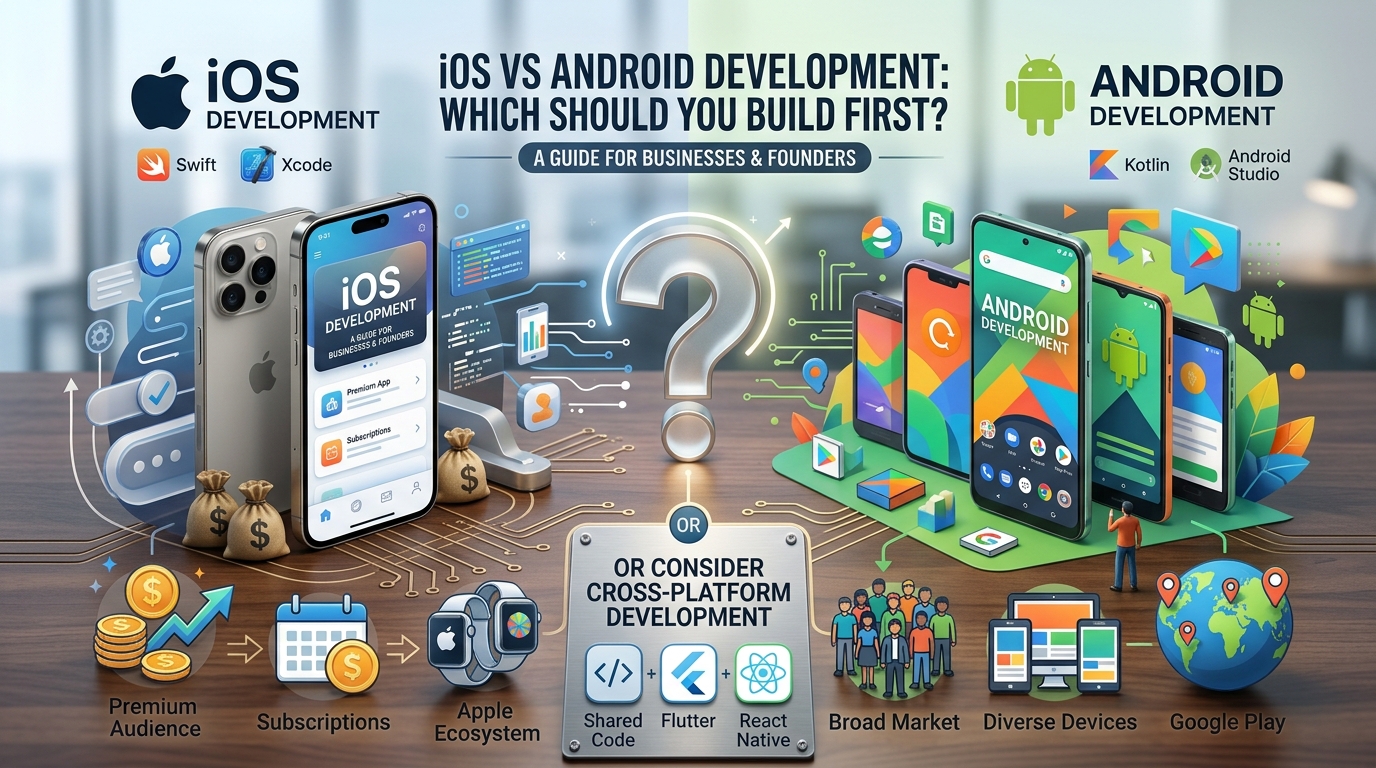
Should you build an iOS app or an Android app first?
Both platforms offer significant opportunities, but the right choice depends on your target audience, budget, business model, and long-term goals.
For example, a premium subscription app targeting iPhone users may benefit from launching on iOS first. In contrast, a local delivery startup targeting a broad audience in Android-heavy markets may find Android a more practical starting point.
The decision is not simply about choosing between Apple and Google. It is about identifying where your first version of the app can deliver the greatest business value.
In this guide, we compare iOS and Android development, explore their costs and technical differences, examine real-life business scenarios, and explain when cross platform mobile app development is the smarter option.
Quick answer: Choose iOS first if your target customers primarily use iPhones and your business depends on a focused initial launch. Choose Android first if your audience is concentrated in Android-dominant markets. Consider cross-platform development if you need to reach both audiences with a shared codebase.
1. Understanding iOS and Android App Development
Before comparing the two platforms, it helps to understand how each works.
What Is iOS App Development?
iOS app development involves building applications for Apple’s mobile operating system, used by devices such as the iPhone.
Developers commonly use Swift, Apple’s primary modern programming language, alongside tools such as Xcode and Apple’s software development frameworks.
iOS development is often suitable for businesses that want to deliver a consistent experience across supported Apple devices and take advantage of Apple’s platform capabilities.
Common examples include:
- Subscription-based productivity apps.
- Premium fitness and wellness applications.
- Financial management tools.
- Lifestyle and consumer applications.
What Is Android App Development?
Android app development involves creating applications for devices running Google’s Android operating system.
Developers commonly use Kotlin, along with Android Studio and Android’s development frameworks. Android applications can run on devices from manufacturers such as Samsung, Google, and other smartphone brands.
Android development offers access to a broad range of devices and markets, making it attractive to businesses with diverse customer demographics.
Typical examples include:
- E-commerce and shopping apps.
- Delivery and logistics platforms.
- Educational applications.
- Business tools designed for a wide range of devices.
The important difference is that iOS development focuses on Apple’s ecosystem, while Android development serves a broader device ecosystem. Neither platform is automatically better for every business.
2. iOS vs Android Development: Key Differences at a Glance
The following comparison highlights the factors businesses should evaluate before selecting a platform.
| Comparison factor | iOS development | Android development |
| Primary audience | Apple device users | Users across many Android device brands |
| Common languages | Swift | Kotlin |
| Main development tool | Xcode | Android Studio |
| Device ecosystem | More controlled hardware and software ecosystem | Greater device and hardware diversity |
| Testing requirements | Testing across supported Apple devices and OS versions | Testing across different manufacturers, screen sizes, and OS versions |
| Initial development cost | Depends on features, integrations, and team | Depends on features, integrations, and team |
| UI implementation | Apple platform conventions | Android platform conventions |
| App distribution | Primarily through the Apple App Store | Primarily through Google Play, with other distribution options |
| Best starting point | Businesses with an iPhone-focused audience | Businesses with an Android-focused audience |
One important clarification: development cost is not determined by the operating system alone. App complexity, backend infrastructure, design, security, testing, and integrations can have a greater impact on the final budget.
3. Cost Comparison: Is iOS or Android Cheaper to Develop?
Cost is often one of the biggest concerns when planning custom mobile app development.
However, there is no universal rule that iOS apps are cheaper than Android apps, or vice versa.
iOS Development Costs
An iOS-first approach can help a business concentrate its initial budget on one platform. The team can focus on a defined device ecosystem, build core features, and collect feedback before expanding.
Potential expenses include:
- UI and UX design.
- Swift development.
- Backend development and API integrations.
- Device testing and quality assurance.
- App Store preparation and maintenance.
Android Development Costs
Android-first development also allows a business to focus its initial resources on one platform.
However, depending on the target audience and supported devices, the team may need a broader device-testing strategy to account for differences in screen sizes, hardware capabilities, and operating system versions.
Potential expenses include:
- UI and UX design.
- Kotlin development.
- Backend development and API integrations.
- Device compatibility testing.
- Google Play preparation and maintenance.
What About Cross-Platform Development Costs?
Cross-platform mobile app development uses technologies such as Flutter or React Native to share substantial portions of the application code across iOS and Android.
This can reduce duplicated development work, but it does not eliminate all platform-specific effort. Native integrations, complex animations, specialized hardware features, and separate platform testing may still require additional work.
Practical takeaway: If your budget is limited, compare the total cost of building and maintaining your required features on each platform. Do not select a platform based on a blanket claim that it is always cheaper.
4. Which Platform Has the Better Target Audience?
The best platform is the one that connects your app with the people most likely to use and pay for it.
Choose iOS First If Your Customers Primarily Use iPhones
An iOS-first launch may be appropriate when:
- Your customer research shows strong iPhone adoption.
- You are targeting a premium consumer segment.
- Your product depends on Apple-specific capabilities.
- You want to validate a focused initial product before expanding.
For example, imagine a startup building a premium meditation app for professionals who already use iPhones and Apple Watch devices. Launching on iOS first could help the team test subscriptions, retention, and wearable integrations before investing in a second platform.
That does not mean iPhone users always spend more or that Android users are less valuable. Actual purchasing behavior depends on the market, audience, pricing, and product category.
Choose Android First If Your Audience Is Android-Heavy
Android-first development may make more sense when:
- Your customers primarily use Android devices.
- Your business targets markets with strong Android adoption.
- Your application serves a broad consumer audience.
- Your product needs to support many device types.
Consider a startup launching a local grocery delivery service. If its target customers predominantly use affordable Android smartphones, building an Android app first may provide better access to its initial market.
The business can validate ordering, delivery tracking, and payment workflows before investing in iOS expansion.
The rule is simple: Use customer data, not assumptions about which platform is more popular or profitable.
5. User Experience and Performance: Which Is Better?
Both iOS and Android can support fast, secure, and user-friendly applications. The experience depends on the quality of the design, implementation, testing, and infrastructure.
iOS User Experience
Apple provides established design conventions and a comparatively controlled hardware ecosystem.
This can make it easier for teams to create a consistent experience across supported iPhones. However, developers still need to account for differences between OS versions, screen sizes, accessibility settings, and device capabilities.
Android User Experience
Android supports a wider variety of devices and hardware configurations.
This flexibility allows developers to serve different customer needs, but it can also increase testing requirements. An interface that works perfectly on one device may need adjustments on another.
Performance Comparison
Neither platform is inherently faster for every application.
Performance depends on factors such as:
- Application architecture.
- Code quality.
- API response times.
- Image and data handling.
- Memory management.
- Device hardware and operating system behavior.
For example, a food delivery app with slow order tracking may have a poorly optimized backend rather than a platform-specific performance problem.
The best approach is to define performance targets and test the application on representative devices before launch.
6. Real-Life Business Scenarios: Which Should You Build First?
Consider these illustrative scenarios to understand how platform selection works in practice.
Scenario 1: A Premium Fitness Startup
A startup plans to offer personalized workout plans, subscription payments, and Apple Watch integration. Its early customer research shows that most target users own iPhones.
Recommended approach: iOS first.
The company can validate subscription conversion, workout engagement, and wearable features with its core audience. It can then use customer feedback and revenue data to decide when to launch on Android.
Scenario 2: A Local Delivery Business
A delivery company wants to serve customers across a city where its research shows that most target customers use Android devices.
Recommended approach: Android first.
The team can concentrate on essential features such as product browsing, checkout, order tracking, and delivery notifications. An iOS version can follow when demand and budget justify expansion.
Scenario 3: A SaaS Startup Serving Both Platforms
A business is building a project management app for teams that use a mixture of iPhones and Android devices.
Recommended approach: Evaluate cross-platform development.
Flutter or React Native may allow the team to share business logic and much of the interface code. This can support a coordinated launch across both platforms without building every feature twice.
Scenario 4: A Banking or Healthcare Application
A company is developing an application that handles sensitive information, authentication, and complex device integrations.
Recommended approach: Choose based on requirements, not convenience alone.
The team should evaluate security controls, regulatory obligations, accessibility, supported devices, and integration requirements. Native development may be appropriate for certain features, while cross-platform development may still be viable with the right architecture and expertise.
These scenarios demonstrate that the best first platform depends on the business problem, not a universal industry rule.
7. Native vs Cross-Platform Mobile App Development
Choosing iOS or Android is only part of the decision. You must also decide whether to build separate native applications or use a shared cross-platform codebase.
What Is Native App Development?
Native development means building an application specifically for a particular operating system.
For example, a company might build its iOS app with Swift and its Android app with Kotlin.
Advantages:
- Direct access to platform-specific APIs.
- Strong control over platform-native interactions.
- Flexibility for complex or specialized features.
- Independent optimization for each operating system.
Disadvantages:
- Separate platform development efforts.
- Potentially higher combined maintenance costs.
- More coordination when delivering equivalent features on both platforms.
What Is Cross-Platform App Development?
Cross-platform development allows teams to build applications for multiple operating systems using a shared technology stack.
Popular options include Flutter and React Native.
Advantages:
- Code sharing across platforms.
- Potentially faster delivery for common features.
- More consistent business logic.
- Reduced duplication for some maintenance tasks.
Disadvantages:
- Platform-specific adjustments may still be required.
- Some integrations require native code.
- Testing is still necessary on both operating systems.
- Complex performance or UI requirements may need extra engineering.
Native vs Cross-Platform: Quick Comparison
| Factor | Native development | Cross-platform development |
| Codebase | Usually separate for iOS and Android | Substantial code sharing |
| Platform-specific control | Direct | Available, sometimes through native integrations |
| Time to launch both platforms | Often requires more duplicated work | Can be faster, depending on scope |
| Maintenance | May involve separate implementations | Shared code can simplify some updates |
| Complex device features | Direct platform access | Depends on framework support and integrations |
| Best fit | Platform-specific or highly specialized apps | Products that need broad reach with shared functionality |
The key is to evaluate the application you actually intend to build. A simple booking app and a complex augmented reality product have very different technical requirements.
8. How to Decide Which Platform to Build First
Use this practical decision-making process before committing your development budget.
Step 1: Research Your Target Customers
Find out which devices your intended users own, what problems they want solved, and whether they are willing to pay for the solution.
Use interviews, surveys, competitor research, and existing customer data where available.
Step 2: Define Your Minimum Viable Product
Your minimum viable product (MVP) is the simplest useful version of your app that can test your core business assumptions.
Identify the essential features before choosing a technology stack.
For example, a booking app may initially need account creation, appointment scheduling, payments, and notifications not every feature planned for the next three years.
Step 3: Set a Realistic Budget
Include development, design, testing, hosting, maintenance, security, and future updates.
If you plan to support both platforms eventually, estimate the total cost of ownership rather than considering launch costs alone.
Step 4: Evaluate Technical Requirements
List the features that could influence your decision, such as Bluetooth, background processing, camera access, wearables, location tracking, or advanced animations.
Ask your development team to identify any platform-specific constraints before development begins.
Step 5: Plan Your Expansion Strategy
Decide what success looks like for the first release.
Useful metrics include user activation, retention, conversion rate, revenue per user, crash rate, and customer acquisition cost.
Expand to the second platform when customer demand, product performance, and available resources support that decision.
9. Common Mistakes to Avoid When Choosing a Mobile Platform
Avoid these common mistakes during app planning:
- Choosing based only on popularity: A large global user base does not guarantee access to your target customers.
- Assuming one platform is always cheaper: Actual cost depends on features, architecture, testing, and team experience.
- Ignoring maintenance: Apps need security updates, bug fixes, operating system compatibility work, and ongoing improvements.
- Treating cross-platform as a shortcut for everything: Shared code reduces duplication, but it does not remove the need for platform-specific testing.
- Building too many features initially: An oversized first release can delay market validation and consume budget before customer demand is proven.
- Skipping market research: Platform decisions should reflect real user behavior, not personal preferences.
Avoiding these mistakes helps businesses make more informed investment decisions and build a stronger foundation for future growth.
10. Final Verdict: Should You Build iOS or Android First?
There is no single winner in the iOS vs Android development debate. The right choice depends on your customers, technical requirements, budget, and business objectives.
Choose iOS first when your validated audience is primarily on Apple devices and an iOS launch best supports your initial product strategy.
Choose Android first when your target audience is concentrated on Android or your business needs to prioritize access to a particular Android-heavy market.
Choose cross-platform mobile app development when you need to reach both audiences and your application can benefit from a shared codebase.
For some businesses, building two native applications from day one is justified. For others, launching on one platform first is a more practical way to validate demand and reduce initial investment.
Before making your decision, define your target audience, prioritize your MVP features, compare total development costs, and identify the technical requirements that matter most.
The smartest platform is not necessarily the one with the most users. It is the one that helps your business solve a real customer problem, validate its product, and grow sustainably.
Frequently Asked Questions
Is iOS or Android development better for startups?
Neither is universally better. iOS can be a good starting point for startups targeting an iPhone-focused audience, while Android may be more suitable for businesses serving Android-heavy markets. The decision should reflect customer research, budget, and product requirements.
Is iOS app development more expensive than Android development?
Not necessarily. Costs depend on application complexity, developer rates, integrations, testing, and maintenance. Compare estimates for the same features and quality requirements before choosing a platform.
Should I build an iOS app or an Android app first?
Build for the platform used most by your target customers, provided it supports your required features and business model. If you have limited data, conduct customer research or test demand before making a major investment.
What is cross-platform mobile app development?
Cross-platform mobile app development uses technologies such as Flutter and React Native to build applications for iOS and Android with a substantial amount of shared code. It can reduce duplicated work, although platform-specific development and testing may still be necessary.
Is native development better than cross-platform development?
Native development offers direct access to platform APIs and detailed control over platform-specific behavior. Cross-platform development can be more efficient when the app has similar requirements on both platforms. The best choice depends on performance needs, integrations, timeline, and budget.